Introducing Deder Build Tool 🔗
For the past few months I've been building Deder, a build tool for JVM projects (Java and Scala).
It started as an experiment to prove myself I can build one, and potentially improve on some quirks in the existing build tools.
Deder is in its early days, but it is already building and publishing several of my own projects, including itself.
Existing build tools like Maven/Gradle/sbt are mature, battle-tested, and power huge parts of the JVM ecosystem for good reasons.
This isn't a "tool X is bad, use mine instead" post. Use whichever you prefer.
Goal: As few knobs as possible 🔗
TLDR: provide minimum number of config options (with good defaults) that get the job done.
The simplest possible build tool would have zero configuration. You'd point it at your code, it would do what you mean (read your mind?), and you'd never open a build file, ever. That's obviously not achievable, you do need to tweak some things: name, Scala version, dependencies etc. But it's a useful principle in general, one we should strive for! In real life this usually means having minimal config options, and having good defaults.
Maven does a pretty good job here with pom.xml which is ~typesafe, you get IDE autocomplete and other goodies. But it lacks some abstraction capabilites, say for cross-scala/cross-platform builds.
See scala-cross-maven-plugin for a glimpse of it. There is also polyglot-maven that allows you to write build in yaml/java/scala etc.. which in itself points at the issue I mentioned above, XML is not a good abstraction level for writing builds (at least for the Scala builds..).
Scala CLI sits in an interesting middle ground: the //> using directives right in your source files give you a genuinely minimal, almost zero-config experience for a script or a single module. It's fantastic for those use cases. It's just solving a narrower problem - once you have several modules with real dependencies between them, cross-builds, you tend to gravitate towards a full build tool like sbt or Mill, directives alone don't really scale to that.
On the other side of spectrum are sbt/Gradle/Mill, which give you a full-blown programming language (and more!), because why not? 🤷♂️
Most of these have custom DSLs for tasks graph, so you are essentially "inside the build", reconfiguring it however you like, reordering tasks etc. This means you really have to know what you are doing, otherwise you can mess up the ordering, caches and what not.. Sbt is notorious for its mutable builds, scopes/axis, macros and other high-level complexity levers. See this amazing post from Haoyi: So, what's wrong with SBT? which will give you much more insight into its complexity.
None of these are wrong per se.
They are just different answers to "where should the complexity live, and when should the user have to see it."
One good resource I recommend is the Configuration Complexity Clock.
Deder strives for a middle ground, somewhere in between: not a simple file format like XML/YAML, but not a full-blown programming language either. I picked Apple's Pkl language for it.
Build config with Pkl 🔗
A Deder build file is written in Pkl, a statically typed configuration language. You can use classes, default values, validation, functions, loops etc. There is no macros, higher-kinded-types, user-defined-generics, scopes and other miracles. Just simple, plain config that you can serialize into JSON/YAML for inspection. Makes it easy to see what's being applied to your project/modules. It has a pretty good IDE support, and it is really fast.
A minimal, one-module build file called deder.pkl looks like this:
amends "https://sake92.github.io/deder/config/early-access/DederProject.pkl"

local const app: ScalaModule = new {
  id = "app"
  scalaVersion = "3.7.4"
}

modules {
  app
}
Don't worry about the exact Pkl syntax for now, you will get used to it pretty quickly.
You can use autocomplete in IDE to guide you through. Every property is right there at your fingerprints, with good docs and go-to-definition.
As you can see above, we amend (think .copy in scala terms, immutable) a config called DederProject.pkl. It expects a list of modules. Here we only define one. As you might expect, the app module sources are in app/src (based on its id). Module id is used through CLI, BSP etc.
The project above defines only one module, without tests. But usually we want to define test module too in one go, so we need helpers. Pkl has a Class-as-a-Function Pattern. This is how it looks like:
amends "https://sake92.github.io/deder/config/early-access/DederProject.pkl"

local const appModules = new CreateScalaModules {
  root = "app"
  template = new {
    scalaVersion = "3.7.4"
    mainClass = "app.Main"
  }
  testTemplate = (template.asTest()) {
    deps {
      "org.scalameta::munit:1.2.1"
    }
  }
}.get

modules {
  ...appModules
}
This defines 2 modules with ids app and app-test.
We pass "templates" for main and test module.
There is also a helper method to "cast" main module to a test module, see template.asTest().
There is another set of helpers for Scala.js, ScalaNative cross-platform builds. You can find them all in Deder tutorials docs section.
Being "minimal" doesn't mean "no reuse". There are a few things that usually mean reaching for a plugin or a build-script helper function, that are just plain config in Deder (or Pkl rather):
- a curated set of compiler flags - the kind of thing sbt-tpolecat exists for sbt users - can just be a named list of scalac options defined once in your
deder.pkland applied to every module's template. It's still data; you're defining a value and reusing it, not writing a plugin. See DederTpolecat.pkl - a curated set of project templates - e.g. sbt-typelevel can be a set of
ScalaModules which you amend as you like. See DederTypelevel.pkl - source folders layout is a parameter, not a convention you fight. Deder uses flat layout by default, but you can set one parameter to switch to Maven-style, sbt-style and other layouts out of the box. E.g. sbt's version-specific source directories (
scala-3/,scala-3.7/, etc.) for sharing code across Scala versions - selected with a singlelayoutfield - cross-scala-version and cross-platform modules (JVM/JS/Native) are likewise declarative:
CreateCrossModulesgenerates the whole shared/jvm/js/native module set from one template, in any of the standard sbt-style cross-build layouts, without you hand-wiring the source sets yourself
The common thread: these are all things you configure, not things you script or make a plugin for.
Look, don't guess 🔗
Most of the complexity in a build tool doesn't come from configuration, it comes from not knowing what your build is actually doing. "Why did this also rebuild module B?" "What will running this command actually execute?". Usually you answer that by reading logs, or by reading the build tool's source.
You can ask Deder directly, before anything runs:
# what modules are defined in this project?
deder modules
# how are they depending on each other, as an SVG diagram.. :)
deder modules -f mermaid | mmdc -i - -o modules.svg

# what tasks exist on app module?
deder tasks -m app
# how they depend on each other, again as a diagram!
deder tasks -m app -f mermaid | mmdc -i - -o app_tasks.svg

# what exactly will run, and in what order (parallel?)
deder plan -m app -t compile
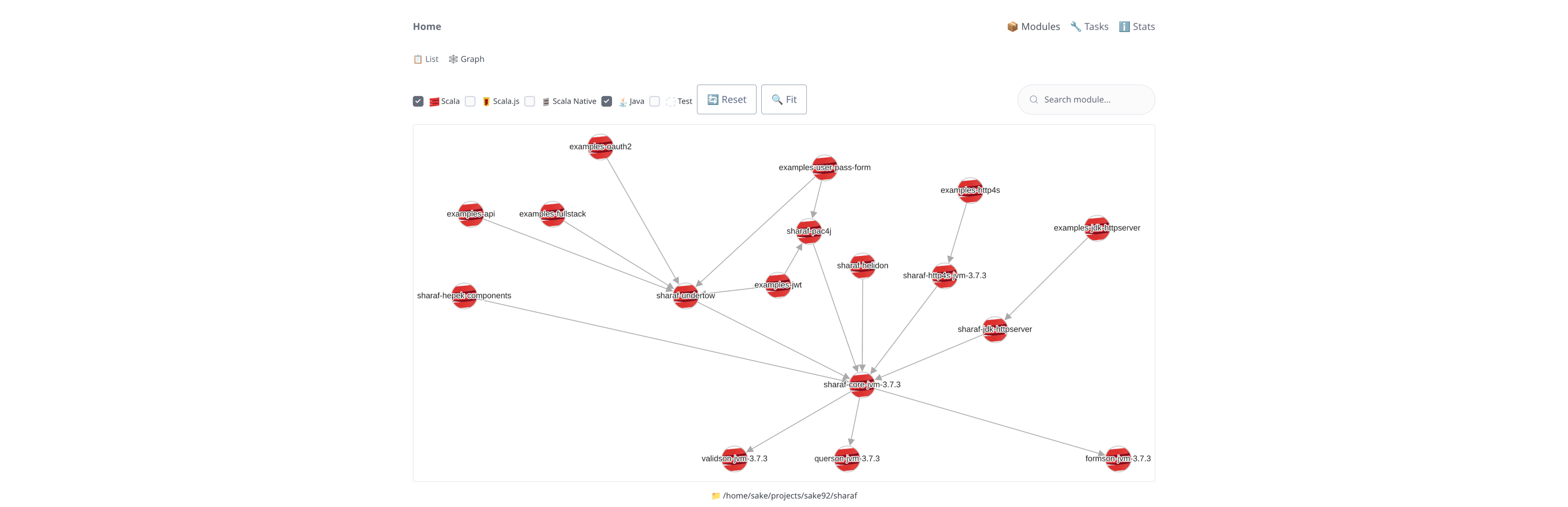
Most of the commands can render the answer as text, JSON, or a graph (DOT/Mermaid), so "what does my build do" can literally be a picture instead of a debugging session (log/println if supported..). If you never ask (or just don't care), you never see it - but it's there the moment you want to look under the hood.
If you want to go one layer deeper still, there is the web dashboard plugin which gives you the same information in a browser.
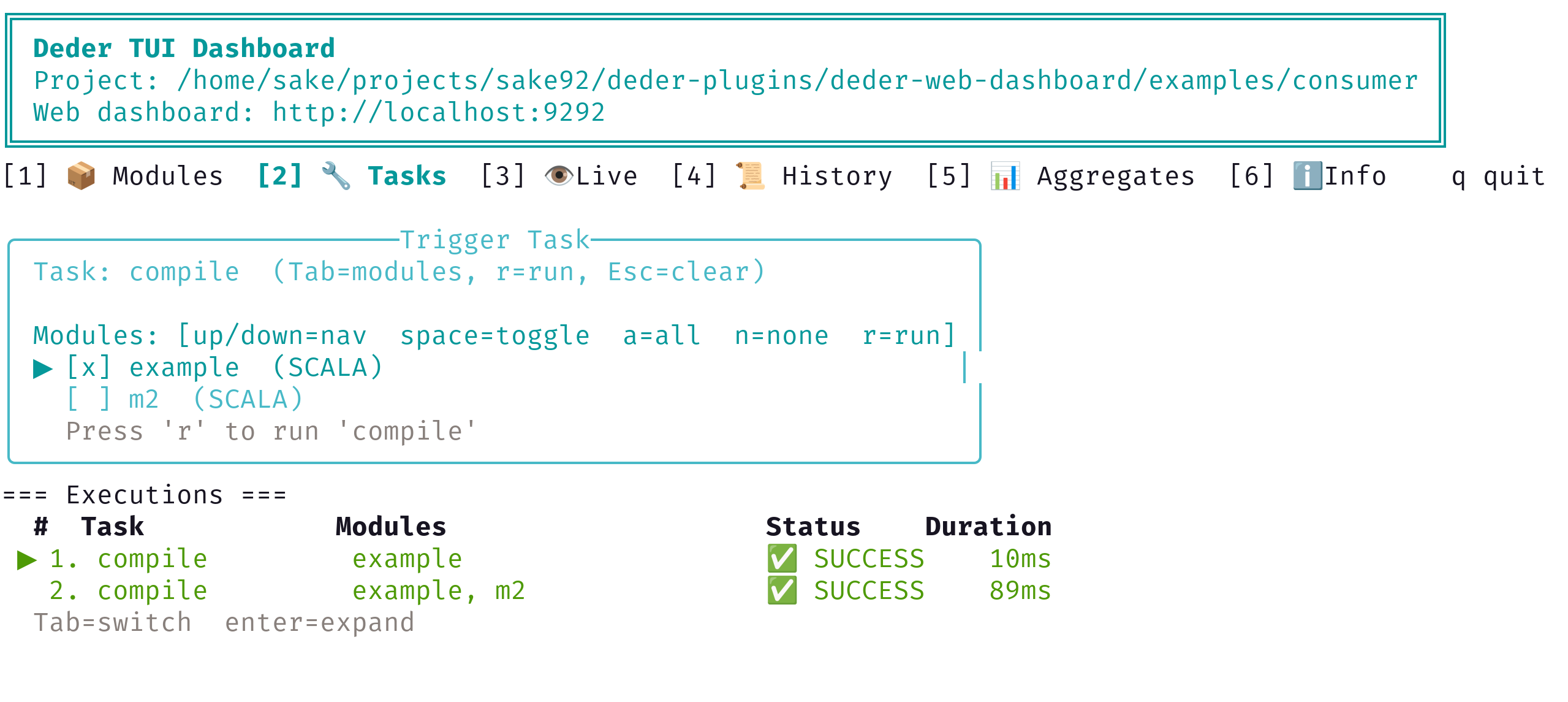
There is also a nice TUI for it:
Deder also supports OpenTelemetry tracing, logs, and metrics for the cases where you're debugging build performance, not just build structure.
One server, many clients 🔗
The deder command you type is a thin CLI client; it talks JSON-RPC over a Unix socket to a single long-lived server process per project. That sounds like an implementation detail, but it changes a few things in practice that are easy to undervalue until you've lived without them:
- no cold start - the JVM, the JIT, Zinc's incremental compiler state, and dependency-resolution caches all stay warm across invocations - not just within one watch session. Of course, it does shut down after certain period of inactivity, to save resources.
- the file watcher is simplified - server is always watching files when you start it, so
--watchmode tends to feel closer to "compiled by the time I look" than "started compiling when I looked." - multiple clients, one source of truth - because the server is the single thing actually doing the work, you can have a
--watchrunning in one terminal and run an ad-hocdeder exec -t test -m mymodulein another, against the same warm state, without them fighting each other or duplicating work. Same thing for BSP too, it runs as a thin client which talks to server.
There is one more subtler benefit for CLI: getting a client-server build tool to behave well for interactive processes - anything that reads from stdin, or needs Ctrl+C to actually land - is harder than it looks. I wrote up a small test repo comparing how Maven's, Gradle's, Mill's, and sbt's daemons handle a trivial program that just asks for terminal input. Maven's daemon blocks at the read with no way to type anything; Gradle's and Mill's daemons hand the process a null input instead of your keystrokes (both, by default, run the process inside the daemon, which doesn't have your terminal). Of the bunch, only sbt's client-server mode gets this right - and it does it by handing the actual process execution back to the client, where your real terminal is, with the server just orchestrating. Deder follows that same approach: the server does the compiling and dependency work, but the program you run executes attached to your terminal via the client, so stdin, signals, and TTY behavior all work the way you'd expect from running it directly with java.
Batteries included 🔗
Most projects need to:
- format the sources
- compile the code
- test it
- package and publish artifacts
A decent chunk of a typical sbt or Maven build's plugin list exists to do things that, in most ecosystems, every non-trivial project eventually needs: build an uber-JAR, generate a POM, publish to a Maven repo, format code, run a linter. Each of those is usually its own plugin, with its own settings keys, its own version to track, and its own way of plugging into the build.
In Deder, these are just built-in tasks, no plugins required:
jarbuilds a plain JAR,assemblybuilds an uber-JAR (optionally with shading rules)publishLocalbundles a JAR withpom.xmland copies it to your local~/.m2repository;versionis resolved automatically from git tags via SemVer (if you don't set one explicitly)publishsigns the module artifacts and then publishes them to a remote repository like Maven CentralrunMvnApp fmt/runMvnApp fmtCheckdo formatting and check formatting with Scalafmt. Thefix/fixCheckrun Scalafix rewrites and checks- if you target native binaries,
nativeLink(Scala Native) andgraalvmNativeImageare built into Deder
None of this is meant to say sbt's or Maven's plugin ecosystems are bad - they're exactly why those tools can do almost anything. It's just a different default: in Deder, the common 80% of "package and ship this" is already there on day one, and you only reach for the plugin layer for the genuinely custom 20%.
IDE Support 🔗
Deder speaks the Build Server Protocol (BSP), so VS Code and IntelliJ talk to the same long-lived server as the CLI does. There is no separate compilation or extra server/worker that does this, literally same class files and compiler flags. Metals picks up a deder.pkl file the same way it already recognizes build.sbt or build.mill. Just open the folder and let Metals connect over BSP.
Build file itself is Pkl, so it gets its own editor support for free - Pkl has official VS Code and IntelliJ plugins with autocomplete, inline docs, and type-checking. Editing deder.pkl feels like editing a typed config file, not hand-rolling XML or guessing at an internal DSL's API.
Extending Deder with Plugins 🔗
Sometimes "batteries included" genuinely isn't enough, and you need something custom - a new task, integration with some other tool, a code-gen step. In that case you probably need to write a Deder plugin. There are a few in deder-plugins, like build-info generation, source-gen-scala-scripts (think sbt sourceGenerators), protobuf support, web dashboard, and a TUI client.
Plugins are regular Scala code built against the Deder plugin API. The configuration for them is also written in Pkl, which provides users some config-time type safety.
Where it stands today 🔗
Deder currently supports compiling, testing, packaging (plain JAR, uber JAR, Scala.js bundles, Scala Native binaries, GraalVM binaries), watch mode, BSP for IDEs, OTEL tracing/logs/metrics, a web dashboard plugin, and experimental import from existing sbt projects.
It's used today in a few of my own open-source projects (deder, sharaf, regenesca, squery, tupson).
There will be some breaking changes in future, and the plugin/community ecosystem is nowhere near what sbt or Maven have built up over the years. That's a real reason to pick those tools today for most projects. Deder is for people curious about a build tool that tries hard to keep the default path boring, while still letting you go deep when you actually need to.
If this sounds interesting:
- code & docs: github.com/sake92/deder
- docs site: sake92.github.io/deder
- plugins: github.com/sake92/deder-plugins
- install via Homebrew on Mac/Linux (
brew install sake92/tap/deder) or Scoop on Windows
The codebase is small - ~17.000 lines of Scala and Java (excluding tests and generated config bindings). You could read the entire codebase in an afternoon.
Feedback, issues, and contributions are very welcome!